
- Quick Thermostat Blank Screen Checklist (10 Minutes or Less)
- How to Troubleshoot a Thermostat With No Power, Step by Step
- Multimeter Checks and Signs You Need a Professional
- When to Stop Troubleshooting and Call an HVAC Technician
- What Upright Construction & HVAC Sees Most Often in the Field
- Can a Thermostat’s Internal Components Just Fail?
- Could a Software Update Be Causing the Blank Screen?
- Does Troubleshooting Differ by Thermostat Brand?
- Battery-Powered vs. Hardwired: Why It Changes Your Diagnosis
- A Word From Ernie M
- Same-Day Thermostat Repair From Upright Construction & HVAC
- Sources
- FAQ
- Recommended
A blank thermostat screen almost always means the unit lost power, either from dead batteries or a break somewhere in the 24VAC circuit that feeds it. Start by swapping the batteries and reseating the thermostat on its base. If the screen stays dark, work through the checklist below before you assume the thermostat itself is broken.
TL;DR:
- Most blank thermostat screens are caused by power loss from dead batteries, tripped breakers, or faulty wiring, not internal hardware failure.
- Proper troubleshooting involves checking the batteries, resetting breakers, inspecting the furnace door switch, and clearing condensate drain obstructions.
- Using a multimeter to verify 22 to 28VAC between R and C wires helps determine if power is reaching the thermostat.
- Smart thermostats may freeze or go blank after interrupted firmware updates, which often resolves with a power cycle.
- If troubleshooting steps do not restore power, calling a licensed technician is recommended to diagnose transformer, fuse, or internal component problems.
Quick Thermostat Blank Screen Checklist (10 Minutes or Less)
Run these checks in order. Most blank screens get solved before you hit number four.
- Replace the batteries. Even thermostats that seem “hardwired” often run on AA or AAA batteries as backup, and corroded contacts are just as common a culprit as dead cells.
- Rule out sleep mode or a dimmed display. Tap the screen or press any button; check the brightness or display settings if the unit has a menu for it.
- Check the HVAC breaker. Head to your electrical panel and look for a tripped breaker labeled furnace, AC, or air handler.
- Find the service switch. Most air handlers and furnaces have a light switch style disconnect nearby. Confirm it is flipped to “on.”
- Inspect the furnace or air-handler door. If it is not fully latched, a safety switch cuts power automatically, and check the drain pan under the coil for standing water while you are there.
Pro Tip: Keep a spare set of batteries taped inside your electrical panel door. It sounds small, but it turns a “call the technician” moment into a two-minute fix.
How to Troubleshoot a Thermostat With No Power, Step by Step
Once the quick checklist is done, it is time to go a level deeper. Everything here is safe for a homeowner to do without opening any live electrical panels.
Replacing the batteries correctly
Pop off the faceplate (most snap or slide away from the base) and look for the battery compartment. Most models take two AA or AAA batteries. Polarity matters here: match the plus and minus symbols exactly, because reversed batteries will not damage the unit but will leave the screen just as blank as before. While the plate is off, look at the metal contacts inside. A little white or greenish crust means corrosion, and a pencil eraser or dry cloth usually clears it enough to restore contact.
Resetting the breaker and service switch
Locate the breaker for your furnace or air handler in the main electrical panel. If it is tripped, it usually sits in a middle position rather than fully “on” or “off.” Flip it firmly to off, wait about 10 seconds, then flip it back to on. Do the same with the service switch near the indoor unit itself, which looks like a standard wall light switch mounted on or next to the equipment. If either one trips again immediately after resetting, stop. That is a sign of an electrical fault, not a simple glitch, and it belongs to a licensed technician.
Checking the furnace or air-handler door
Manufacturers install a door safety switch specifically so the blower cannot run with the panel open. If that door is even slightly ajar, or if it was bumped during a filter change, the switch cuts 24-volt power to the thermostat along with everything else. Push the door firmly until it seats and listen or feel for the latch. It should not wiggle.
Clearing the condensate drain
While you have the panel open, look at the drain pan beneath the evaporator coil. Standing water there means your condensate line is clogged, and many systems wire a float switch into that pan specifically to shut things down before the pan overflows into your ceiling or closet. A blocked drain can trip that float switch and cut power to the thermostat entirely. You can often clear a simple clog yourself: locate the drain line’s exterior exit point (usually a PVC pipe near your outdoor unit or through an exterior wall) and use a wet/dry vac sealed against the opening to pull the blockage out. Never use a garden hose to blow water back up into the system.
Reseating the thermostat and checking wiring
Most smart and programmable thermostats mount on a plate with a plug-in connector or spring-loaded terminals. Gently pull the thermostat face off its base, then push it firmly back into place, listening for a click. While it is off, look at the wire terminals for anything obviously wrong:
- Wires that look burnt, frayed, or melted at the tip.
- A wire that has slipped out of its terminal screw entirely.
- Multiple wires touching each other outside their terminals.
If you see any of that, do not try to reconnect or re-strip the wire yourself. Photograph it for reference and call a professional. This is the point where DIY troubleshooting should stop and licensed work should begin.
Pro Tip: Before you touch any wiring, snap a photo of the terminal layout on your old thermostat. If a wire does fall loose, that picture saves your technician time and saves you a guessing game.
Multimeter Checks and Signs You Need a Professional
If batteries, breakers, the service switch, and the furnace door all check out and the screen is still dark, the next diagnostic step needs a multimeter, and it is the most reliable test available for isolating the actual fault.
- Measure R to C at the thermostat wiring. With the faceplate removed, set a multimeter to AC voltage and touch the probes to the R and C wire terminals. A reading of roughly 22 to 28VAC is considered normal when the transformer and control circuit are healthy.
- Check the low-voltage fuse. Furnace and air-handler control boards usually carry a small blade fuse rated at 3 or 5 amps that protects the thermostat circuit. A blown fuse is often visible as a darkened or broken filament inside the glass or plastic housing, and it must be replaced with one of the identical amperage rating, never a higher one.
- Watch for transformer or surge damage. A burning smell, a discolored circuit board, or a thermostat that went dark right after a lightning storm all point toward transformer failure or surge damage, which typically calls for professional replacement rather than a fuse swap.
If you measure normal voltage at R and C but the screen stays blank, the thermostat itself has likely failed and needs replacement rather than further troubleshooting. Learning how thermostats actually source and regulate their power makes this kind of diagnosis much less intimidating the next time it happens.
When to Stop Troubleshooting and Call an HVAC Technician
Some symptoms mean it is time to hand the problem to a licensed pro rather than keep testing.
- A breaker or fuse that trips again immediately after being reset.
- Wiring that looks frayed, melted, or burnt at the terminals.
- Normal R to C voltage but a thermostat that still will not power on.
- Your whole HVAC system stays dead even though the breaker shows power.
Never bypass a safety switch or work inside a live electrical panel to “get the system running.” Door switches and float switches exist to prevent equipment damage and shock hazards, and forcing them defeats the entire point of having them installed.
Before you call, jot down your thermostat’s brand and model, roughly when the screen went blank, which checks you already ran, and whether your furnace or AC is showing any other odd behavior. That short summary usually cuts a diagnostic visit down by a good chunk.
Pro Tip: If your system was working fine until a specific event, a storm, a power outage, a filter change, mention that first. It is often the single biggest clue a technician needs.
What Upright Construction & HVAC Sees Most Often in the Field
In our experience at Upright Construction & HVAC, the overwhelming majority of blank-screen calls trace back to something simple: dead batteries, a tripped breaker, or an open safety switch. Most cases resolve with exactly those quick checks, which is exactly why we always recommend starting there before assuming the worst.
A little prevention goes a long way. Swap thermostat batteries once a year, replace your filter every one to three months, and add a condensate line check to your seasonal maintenance routine. Those three habits alone prevent a surprising share of the “no power” calls we get.
Can a Thermostat’s Internal Components Just Fail?
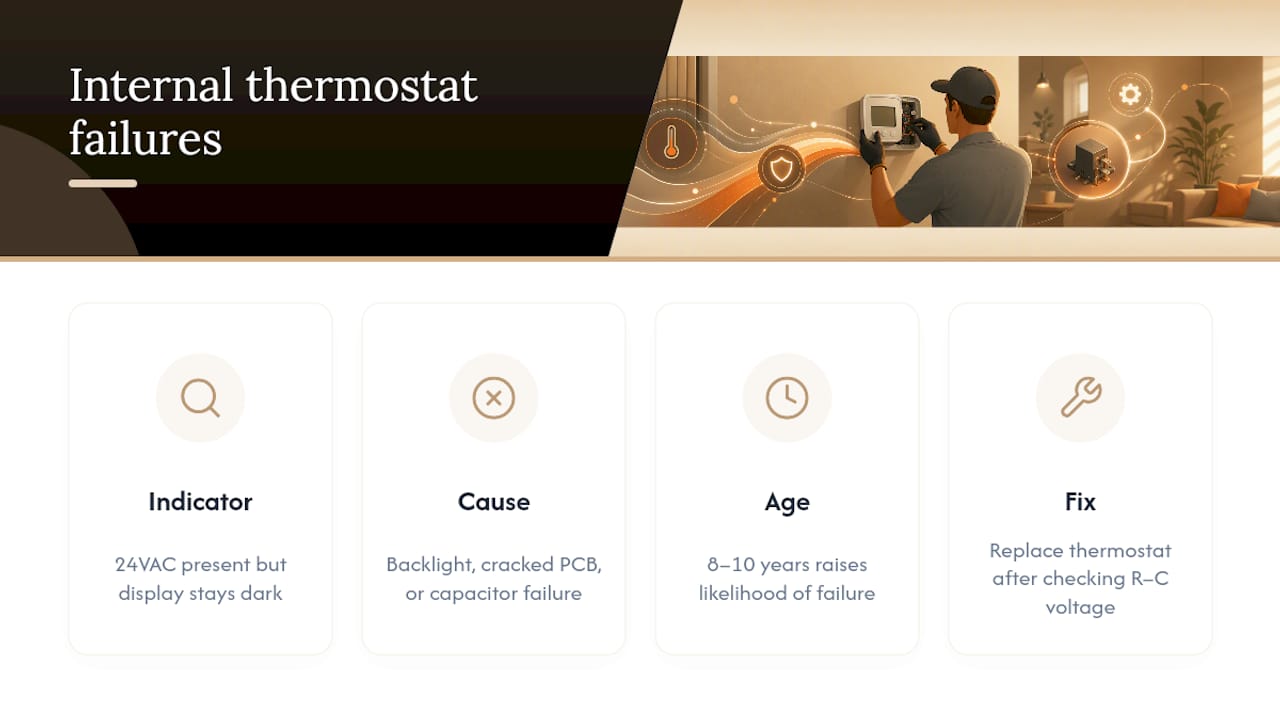
Yes, and this is the scenario homeowners tend to overlook because everything upstream checks out fine. If you measure a healthy 24VAC between R and C but the screen refuses to light up, the fault sits inside the thermostat itself, not the wiring or the transformer feeding it.
Internal failures show up a few different ways. The display backlight can die while the rest of the unit still technically functions, which sometimes fools people into thinking it is a settings issue rather than hardware. A cracked circuit board, often from age, moisture, or a static discharge, can also kill the screen entirely while leaving the relay contacts working, which is why some homeowners report their furnace or AC still cycling on schedule from a “memorized” program even after the display goes dark.
Age matters here too. A thermostat that is eight or ten years old and has never given trouble before is a reasonable candidate for straightforward component failure rather than a wiring problem. Batteries corrode contacts over years of slow leakage, humidity swings in attics and closets stress circuit boards, and the small electrolytic capacitors that power many display screens do wear out.
If you have gone through breakers, fuses, the service switch, the furnace door, and a multimeter check, and the R to C voltage reads normal, hardware failure is the most likely remaining explanation. At that point, replacing the thermostat is usually more practical than continuing to troubleshoot a unit that has already outlived its expected service life.
Could a Software Update Be Causing the Blank Screen?
For Wi-Fi and smart thermostats, yes, a failed firmware update is a real and increasingly common cause of a blank or frozen display. Most connected thermostats download and install updates automatically overnight, and if that process gets interrupted by a Wi-Fi dropout or a power blip mid-update, the unit can freeze on a black screen instead of finishing the boot sequence.
The fix is usually simpler than a hardware problem. A power cycle, pulling the thermostat off its base for about 30 seconds and reseating it, often forces the unit to restart the update process or roll back to its last working state. Manufacturer support guidance recommends this exact power-cycle step before assuming the unit needs replacement, and it resolves a meaningful share of blank-screen complaints tied to smart thermostats specifically.
If a power cycle does not bring the screen back, check whether your home Wi-Fi network was down or unstable around the time the screen went dark. Router replacements, ISP outages, and even a router reboot at the wrong moment can interrupt an update mid-download. Some manufacturers also publish known-issue bulletins for specific firmware versions, so checking the manufacturer’s support page for your exact model number is worth the five minutes before you call for service. A thermostat stuck in a bad update loop is one of the few blank-screen causes that genuinely has nothing to do with your home’s electrical system.
Does Troubleshooting Differ by Thermostat Brand?
The core diagnostic order stays the same across brands, but a few manufacturer quirks are worth knowing. Honeywell units, especially older non-connected models, tend to run on battery power alone or as backup to the C-wire, and Honeywell’s own troubleshooting guidance leads with battery replacement and basic power checks before anything else, which matches the order we recommend here.
Trane and other fully wired systems skip batteries entirely on many models and rely solely on the 24VAC transformer circuit, which means a blank Trane thermostat points more directly at breakers, fuses, or the transformer rather than a battery swap. Trane’s support documentation specifically instructs a power cycle first, then contacting a dealer if the screen stays blank.
Smart thermostats from various manufacturers add another layer: many require a dedicated C-wire to maintain constant power for their Wi-Fi radio and full-color display, something older analog thermostats never needed. If yours was recently upgraded from a basic model to a smart one and the screen has been temperamental since installation, a missing or improperly connected C-wire is a strong suspect worth checking before assuming a defective unit. Whatever the brand, checking the model number against the manufacturer’s own support page before calling a technician can save a diagnostic trip entirely.
Battery-Powered vs. Hardwired: Why It Changes Your Diagnosis
Knowing which power setup your thermostat uses narrows your troubleshooting path considerably, and it is worth checking before you start pulling panels apart.
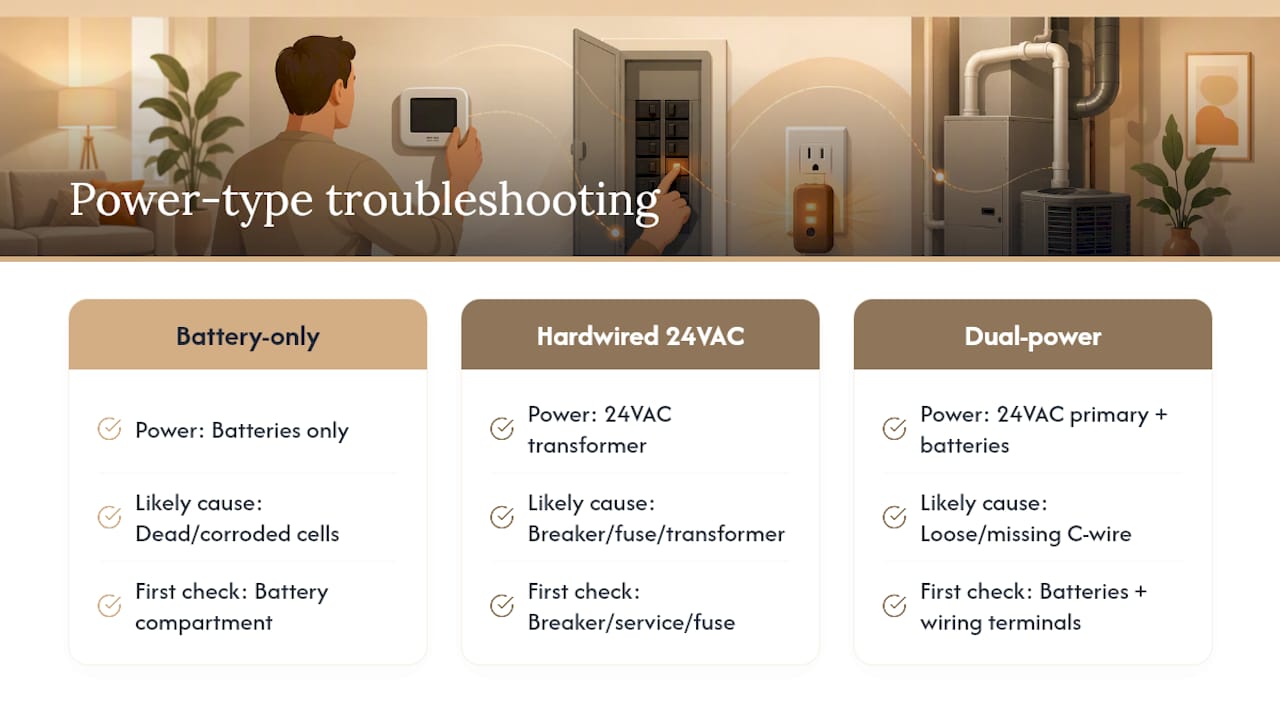
Battery-only thermostats are the simplest case: no batteries means no screen, full stop. These units typically have no backup power source, so a blank screen almost always traces straight back to the battery compartment or corroded contacts, rarely to anything upstream in your HVAC system.
Hardwired thermostats running purely on the 24VAC transformer circuit behave differently. A blank screen here points toward the breaker, the service switch, a blown fuse, or the transformer itself, since there are no batteries to blame. This is also the setup where the R to C voltage test becomes genuinely useful, because it separates a transformer or wiring problem from a failed thermostat unit.
Many modern thermostats, especially smart models, use both: batteries as backup and a C-wire or R-wire connection as the primary power source. These dual-power units can behave intermittently if the C-wire connection is loose or missing even while the batteries remain fresh, which explains why some smart thermostats flicker or reboot randomly rather than staying reliably blank or reliably on. If your thermostat falls into this hybrid category, checking both the battery compartment and the wiring terminals is worth doing in the same visit rather than assuming one power source is automatically the culprit.
A Word From Ernie M
Most people either force a wire that will not seat or bypass a safety switch out of frustration. Don’t. A quick, careful check saves you money; a professional visit saves you from making it worse.
— Ernie M
Same-Day Thermostat Repair From Upright Construction & HVAC
If you have run through batteries, breakers, and the drain pan and your screen is still dark, it is time to bring in a professional rather than keep guessing at wiring you cannot fully see. A licensed technician in the greater Los Angeles area can confirm the diagnosis in one visit instead of a string of trial-and-error fixes.

Book an appointment and a technician will inspect your breaker, service switch, low-voltage fuse, and thermostat wiring on site, then provide a transparent estimate before any repair work starts. If the diagnosis points to a failed thermostat rather than a wiring issue, replacement and setup can often be handled promptly. Visit our HVAC repair page to check availability and get your system back online.
Sources
- Honeywell thermostat not working (manufacturer troubleshooting)
- Thermostat Blank Screen? 5 Causes & 2-Minute Fixes | National HVAC Parts
- My thermostat is blank/has a white or black screen — Trane Home support
FAQ
Why is my thermostat not showing a display?
The most common cause is lost power, either from dead batteries or an interrupted 24VAC circuit, so start with a battery swap and basic power checks before assuming a hardware failure.
Why is the screen off on my thermostat?
Check whether it is in sleep mode or has its brightness turned down first, then move to batteries, the breaker, and the furnace door safety switch if adjusting the display settings does not fix it.
What would make a thermostat go blank?
Dead batteries, a tripped breaker, an open service switch, an ajar furnace door, a clogged condensate drain tripping its float switch, a blown low-voltage fuse, or a failed internal component can all cause a blank screen.
Why is my Honeywell thermostat screen blank?
Many Honeywell models rely partly or fully on battery power, so check and replace the batteries first, then verify breakers and wiring if the screen stays dark.
When should I call a technician instead of continuing to troubleshoot?
Call a professional if a breaker or fuse trips again after reset, if you see frayed or burnt wiring, or if you measure normal 24VAC at the thermostat but the screen still won’t light up.